How to Improve the Internal Linking on a Website
Most websites publish new pages without linking to them from their existing content, missing out
Most websites publish new pages without linking to them from their existing content, missing out on the chance to increase their SERP rankings and provide more value to their audience.
Sounds familiar?
The web’s top-performing pages average 85 internal links, according to Authority Hacker’s study, but in reality most pages only have 3-5 internal links.
In addition, top-ranked search results have higher backlinks compared to lower ranked results:
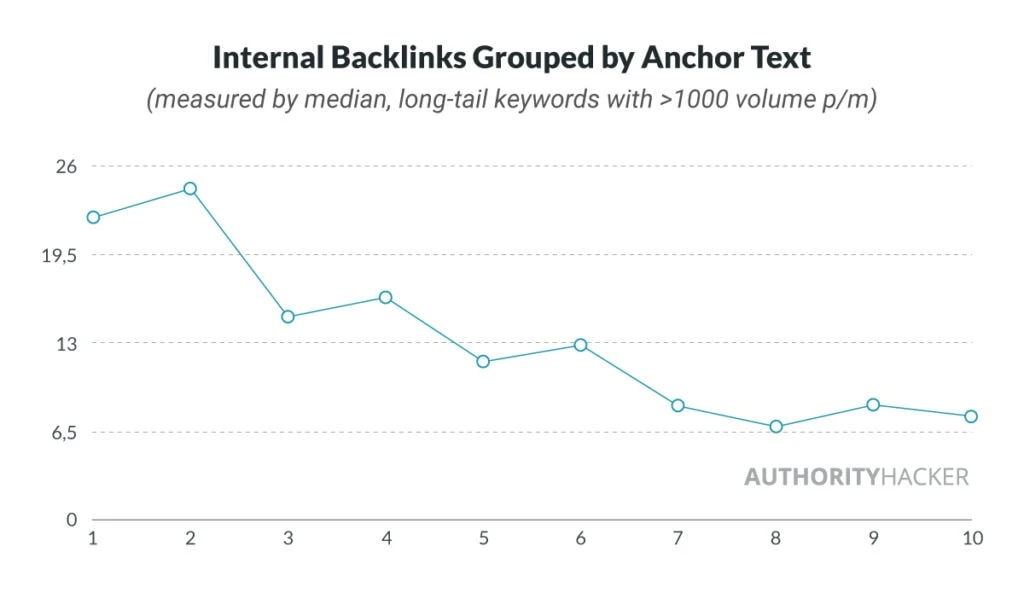
So, internal links carry lots of weight and are something that needs more attention.
This guide is for content managers and website owners who:
- Create regular content but rarely update older posts with new links
- Want their pages to rank faster and better
- Need a clear system for internal linking that doesn’t eat up hours
We will test and show the practical results of top internal linking strategies on our website.
You’ll have a practical process to identify link opportunities, update old content strategically, and build a stronger website structure without getting overwhelmed.
Top 5 Mistakes Website Owners Make with Internal Links
After analyzing dozens of websites across different industries, I’ve noticed several patterns in how organizations handle their internal linking.
1. No page hierarchy
First is the tendency to link from low-authority pages to critical conversion pages, hoping to funnel traffic toward revenue-generating pages.
While pages with lots of external authority can strengthen other pages by passing PageRank through internal links, low-authority pages won’t achieve the same effect. In contrast, these pages may even confuse readers and search engines when it comes to prioritizing pages on your website.
2. Broken links
Broken internal links popped up on almost all websites (even major ones) typically due to URL changes without proper redirects or content deletion without updating internal links.

3. Linking per se
The “more the merrier” mentality leads to excessive internal linking, where every possible keyword becomes a link to another page.
Though this stems from a desire to maximize internal linking benefits, it actually creates a spammy user experience and weakens the value of truly important links.
4. No main navigation
Many websites skip using breadcrumbs navigation to maintain a cleaner design, but they sacrifice valuable navigational context and structured data opportunities in the process.
Here’s what the breadcrumb links looks like:

Navigation links are also another way to tell users and search engines about the site hierarchy.
5. Isolated pages
With deeper analysis you can easily find that many websites have orphan pages (pages that exist without any internal links pointing to them).
This usually happens when content creators focus on producing a lot of content without a clear plan for internal linking.

How to Improve Your Internal Linking: 3 Ideas
Here are three proven ideas that work great standalone, but you really see the true effects when combined together:
1. Turn scattered content into content pillars
Let’s say you run a fitness blog with 50+ scattered pages, and you’ve randomly placed internal links for the “sake of having them.”
Both readers and search engines prefer correlations, and logical patterns, so organizing your pages into content pillars is a great strategy.
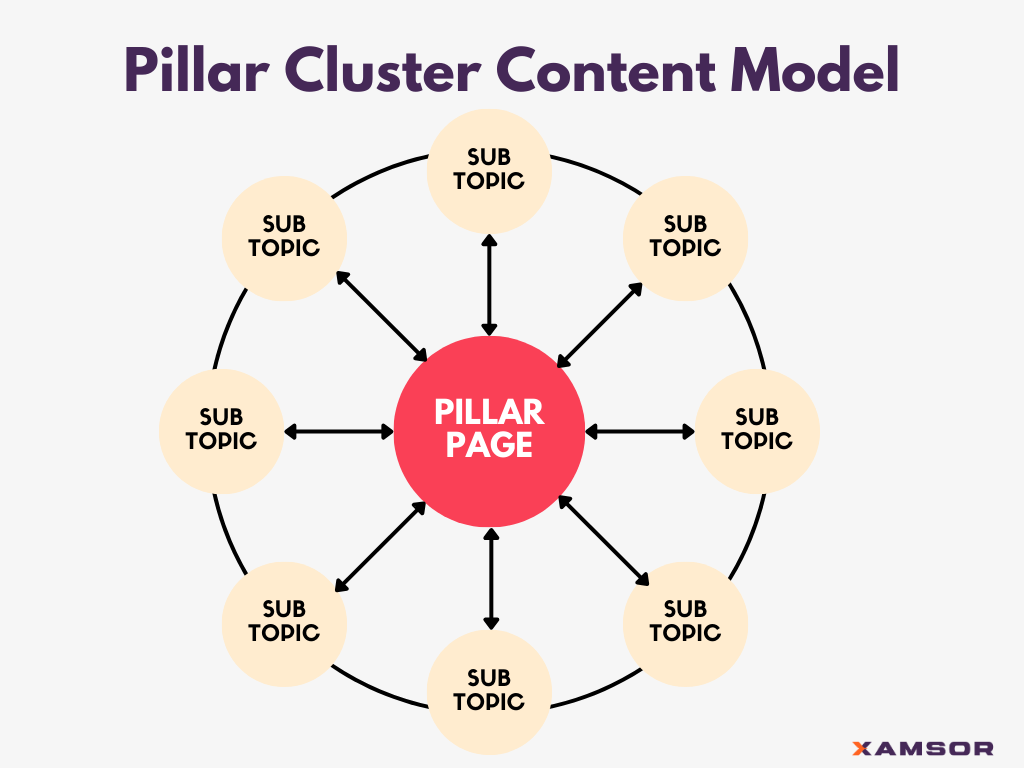
Here’s how to organize them into effective content pillars:
Step 1: Start with content inventory
Create a spreadsheet listing all your pages with these columns:
- URL
- Main topic
- Subtopics
- Word count
- Current performance (traffic/rankings)
Example: Going through your pages, you notice clusters around workout routines, nutrition, supplement reviews, and recovery techniques.
Step 2: Find your natural pillars
Review your inventory and look for content groupings. You might find:
- 15 articles about nutrition and meal planning
- 12 articles about different workout routines
- 10 articles about recovery and injury prevention
- 8 articles about supplements
Step 3: Assess pillar candidates
For each topic group, identify your most comprehensive article. If you have a 3,000-word guide to “Complete Workout Programming,” that’s your natural pillar for the workout routine cluster. If you don’t have a clear pillar piece, flag this for content creation.
Step 4: Map page relationships
Create a simple mind map for each pillar:
- Center: Your pillar content
- Connected nodes: Supporting articles
- Note gaps where you need additional content

Step 5: Optimize existing content and add links
Expand your pillar content to cover all aspects of the topic and update supporting articles to maintain consistency.
Add clear internal links:
- From pillar to supporting articles
- From supporting articles back to pillar
- Between related supporting articles
Does it work? Megan Horn’s website saw a 40% increase in website traffic and sessions after implementing the content pillar strategy.

2. Add links contextually
Now that you know which pages to connect, let’s see how to strategically place these internal links:
Step 1: Placement
Where to put internal links:
- Introduction paragraphs when outlining what readers will learn
- Section headers when introducing new concepts
- Within detailed explanations where deeper information would be valuable
- FAQ sections addressing common questions
- “Related Topics” sections at the end of pages
- Sidebar callouts for particularly relevant content
- Within case studies or example workout plans

For example, in your pillar content “Complete Guide to Workout Programming”:
- When discussing training splits, link “push-pull workout routines” to your detailed guide
- Link “protein intake for recovery” to your nutrition articles when mentioning post-workout needs
- Connect “proper form for compound exercises” to your exercise form guides
- Link phrases like “recommended rest periods” to your recovery articles
Step 2: Anchor texts

Many websites make the mistake of always using the same anchors (in most cases the url tag of the page), but this can be considered spammy and not always contextually relevant.
Always try to make the anchors naturally fit the surrounding text and the whole section. Plus, try to diversify them whenever possible:
- For strength training: “strength training fundamentals,” “basic strength exercises,” “building strength,” “strength training for beginners”
- For HIIT: “high-intensity interval training,” “HIIT workouts,” “interval training methods,” “HIIT programming”
- For recovery: “workout recovery strategies,” “recovery methods,” “optimal recovery time,” “rest between workouts”
Do anchor texts really make a difference? ZYPPY published a case study where they proved URLs with a larger number of anchor text variations from internal links are highly correlated with more Google search traffic.

Step 3: Cross linking
Lastly, here is an example of a cross linking structure plan:
- Strength training article links to both the pillar and relevant HIIT and recovery articles
- HIIT guide links back to strength training for complementary training advice
- Recovery articles link to both workout types for specific recovery protocols
- Exercise form guides link to relevant workout programming sections
Internal linking isn’t a one and done job, but requires constant optimization. That is why you should have your initial linking strategy as a sheet or document that you can easily access and update, to keep track of all the changes.
Remember to update links when you publish new pages that relate to existing ones, update old content with new information, or notice high-performing pages that could boost other pages.
3. Update site navigation and create hub pages
Don’t limit your internal links to on-page but connect your whole website with hub pages and site navigation. Holly Miller Anderson wrote a case study on how the newly added URLs in the header navigation have driven 35% of site visits over 70 days, in addition to the 56% from existing links.

Hub pages are category pages that act as directories for each pillar cluster.
Each hub page needs strong upward and downward linking patterns: Your introduction should link to pillar content, while section descriptions connect to subcategory pages.
Also,every article page should maintain consistent linking patterns: up to its hub page, up to its pillar content, across to related articles, and down to more specific topics.
For instance, your workout hub’s intro naturally links to your “Complete Workout Programming Guide,” while each training style section links to its specific articles and related content.
Your website navigation should reflect your new structure as well:
Workouts > Complete Guide to Programming > Supporting Articles
Your navigation structure reinforces this linking hierarchy through both main menu items and dropdown options. When someone hovers over “Workouts,” they should see links to both the hub page and key subcategories, creating multiple pathways to important content.
In that way each breadcrumb element becomes a clickable link that reinforces your site’s hierarchy and provides additional contextual linking opportunities. This helps both users and search engines understand where content fits within your site’s structure.
How Does Proper Internal Linking Help Your Website
The returns on investing time in internal linking are substantial, yet many websites still treat it as an afterthought. This can be a mistake, since every hour spent analyzing and optimizing your internal linking structure can yield months of improved performance.
Think of it as building a circulatory system for your website, when done properly, it ensures every page receives the attention and authority it deserves. Here are the main benefits of proper internal linking:
1. Your website becomes easier to find and crawl
Internal linking creates clear pathways for search engines to discover and index your content. It is like building a network of roads, the better connected your pages are, the easier it is for search engines to navigate your site.

When you implement strategic internal linking, you’re essentially providing search engines with a map of your most important content and your website’s hierarchy ensuring no valuable pages get overlooked in the crawling process. This becomes particularly important for large websites where content can easily get buried several clicks deep.
2. Prospects will stay longer on your website
Strategically placing links within your content, you guide users through a logical progression of information, making it more likely they’ll convert into customers or regular readers.
Rather than forcing users to return to navigation menus or search bars, contextual internal links offer relevant content right where users need it. This creates a smoother browsing experience, leading to longer sessions and higher engagement.
3. You will build topical authority
Internal linking helps establish content clusters that demonstrate your expertise in specific subject areas. When you interlink related content pieces, you create a web of information that shows search engines the depth and breadth of your knowledge on particular topics.
Search engines use this interconnected content structure to understand the relationships between your pages and recognize your site as an authoritative source in your field.
I hope this is helpful. Please share your thoughts on Linkedin. And subscribe to our newsletter.
Max Roslyakov
Founder, Xamsor